
Intent guide
Reminders & Siri → automated GTD triage inbox
Keep quick capture in Reminders. Sync into Clarify Inbox, clarify once, then act from Next Actions—without making Reminders your whole system.
Set up Apple Reminders two-way sync
Apple Reminders sync is a Lifetime Pro feature. Use Reminders (and Siri) as a capture bridge—Clarify remains the system where you clarify and act.
Step 1 — Open Settings
Open Clarify and go to Settings.
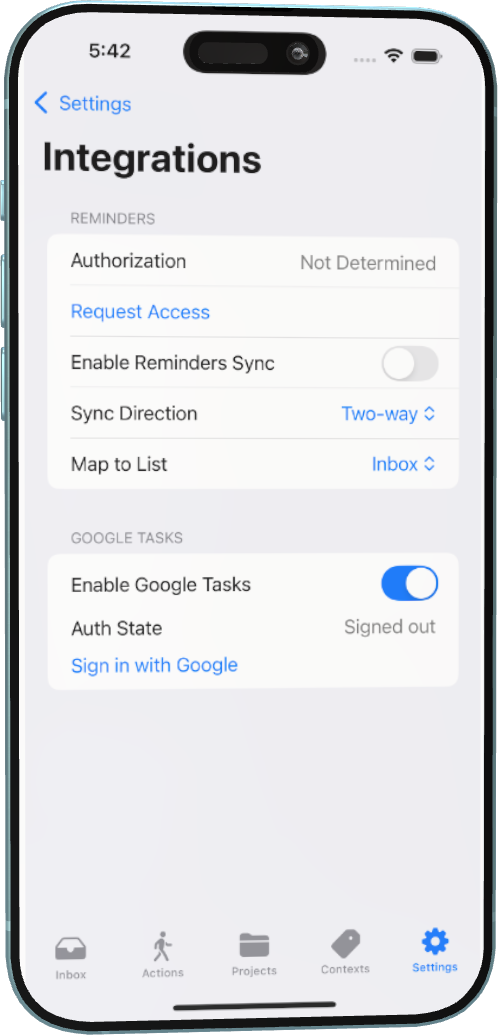
Step 2 — Enable Reminders Sync
Toggle on “Apple Reminders Sync”.
Step 3 — Grant Permission
Authorize access when prompted by iOS.
Step 4 — Choose List Mapping
Select which Reminders list should map to Inbox or Next Actions. Mapping to Inbox is best for triage: capture fast, clarify in Clarify.
Step 5 — Confirm and Sync
Confirm changes and allow the initial sync to complete. New Reminders items (including Siri captures into that list) can flow into Clarify for one-tap routing to Next Action, Waiting For, Project, or Someday.
Bridges unlock with Lifetime Pro. Finish the five-minute core loop first if you haven’t already.